checksec
checksec
checksec은 바이너리에 걸려있는 보안 기법을 확인할 수 있는 툴로, 두 가지 종류가 존재한다.
두 가지를 동시에 다운로드하여 사용한다면 충돌이 일어날 수도 있으니 권장하진 않는다.
간단한 정보를 얻기 위해서는 pwntools에서 제공하는 툴도 나쁘지 않다.
하지만 더 많은 정보를 얻고 싶거나, 리눅스를 사용하면서 checksec을 설치하게 된다면 보통 slimm609의 checksec을 설치하게 될 것이다.
pwntools checksec
pwntools는 파이썬 라이브러리로, 설치법은 공식 문서를 참고하면 된다: https://docs.pwntools.com/en/stable/install.html
pwntools만 설치되면 내장된 checksec은 기본적으로 사용이 가능하다.
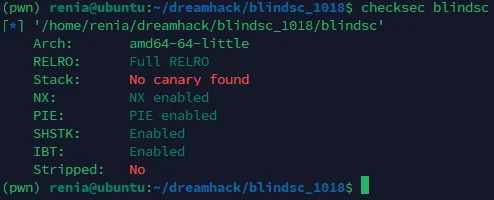
checksec [filename]을 입력함으로써 사용이 가능하며, 세로로 목록이 늘어져 출력된다. 항목은 가끔 다르게 나올 때가 있다. 정확한 기준은 아직 잘 모르겠다. 그러나 Arch, RELRO, Stack, NX, PIE 정도는 고정으로 출력되는 것 같다.
항목이 많지는 않으나, 나와 같은 초보의 입장으로서는 이 정도의 정보만으로도 충분히 문제를 풀러 들어갈 수 있다.
checksec -h의 결과는 다음과 같다.
usage: pwn checksec [-h] [--file [elf ...]] [elf ...]

Check binary security settings

positional arguments:
  elf               Files to check

options:
  -h, --help        show this help message and exit
  --file [elf ...]  File to check (for compatibility with checksec.sh)
slimm609 checksec
기존에 bash로 작성된 checksec을 Golang으로 옮겨 작성한 오픈소스 유틸리티다.
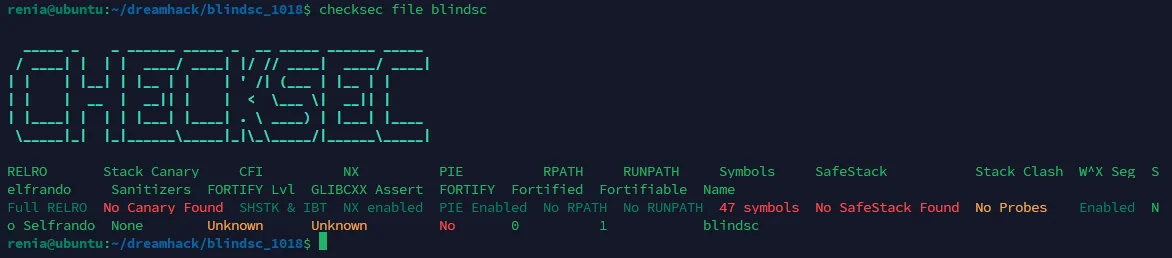
가시성이 좋아보이진 않는다.
checksec file [filename]을 입력함으로써 사용이 가능하며, 좀더 다양한 기능을 지원한다.
checksec -h의 결과는 다음과 같다.
A tool used to quickly survey mitigation technologies in use by processes on a Linux system.

Usage:
  checksec [command]

Available Commands:
  completion  Generate the autocompletion script for the specified shell
  dir         check all files in a directory
  file        Check a single binary file
  fortifyFile Check Fortify for binary file
  fortifyProc Check Fortify for running process
  help        Help about any command
  kernel      Check kernel security flags
  listfile    Check every binary listed in a file (or stdin via -)
  proc        Check a file of a running process
  procAll     Check all running processes
  procLibs    Check all libraries mapped into a running process

Flags:
      --color string     Color output mode (auto, always, never) (default "auto")
      --fail-if string   Exit non-zero if any listed check (comma-separated keys, e.g. relro,canary,pie) is not StatusGood
  -h, --help             help for checksec
  -l, --libc string      Set libc location (useful for FORTIFY check on offline embedded file-system)
      --no-banner        disable the banner
      --no-headers       disable the headers
      --no-warnings      disable warnings
  -o, --output string    Output format (table, json, yaml, xml, csv) (default "table")
  -v, --version          version for checksec

Use "checksec [command] --help" for more information about a command.
가령, checksec file blindsc --output json을 이용해 바이너리 blindsc에 걸려 있는 보호 기법들을 json 형식으로 받아볼 수 있다.
$ checksec file blindsc --output json
[
  {
    "name": "blindsc",
    "checks": {
      "canary": {
        "value": "No Canary Found",
        "status": "red"
      },
      "cfi": {
        "value": "SHSTK \u0026 IBT",
        "status": "green"
      },
      ...
      "symbols": {
        "value": "47 symbols",
        "status": "red"
      }
    }
  }
]
이를 이용해 가시성이 좋지 않던 checksec을 커스텀할 수 있다.
~/.bashrc 끝에 다음의 코드를 추가(source ~/.bashrc 필수)하면 checksecv [filename]으로 사용할 수 있다.
checksecv() {
    checksec file "$1" -o json --no-banner |
    jq -r '
      def color:
        if . == "green" then "\u001b[32m"
        elif . == "red" then "\u001b[31m"
        elif . == "yellow" then "\u001b[33m"
        else "\u001b[37m"
        end;

      .[0].checks
      | to_entries[]
      | "\(.key)\t\(.value.status | color)\(.value.value)\u001b[0m"
    ' |
    awk -F '\t' '{printf "%-16s : %s\n", $1, $2}'
}
complete -f checksecv
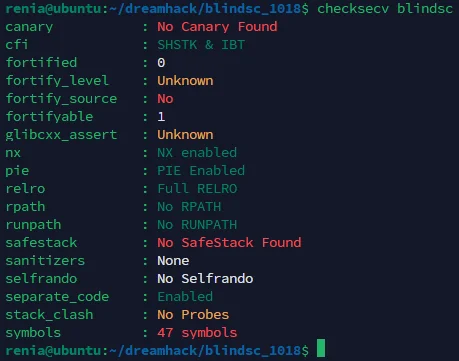
pwntools의 checksec보다 자세한 내용을 출력하면서도 가시성은 비슷하게 따라갈 수 있다.